Posts

Building Coding Skills with Robots and Monsters

Image
Coming up on Tuesday, June 13th from 2-3:30 pm, the Pasadena Public Library will have our next Tablets and Tech program at the Central Library on our 4th floor. Kids will move around different iPad stations exploring a wide range of apps that incorporate accessories for tangible play. Kids will be using the passport below to assist them in taking turns to explore each app.  Many of the apps have educational benefits for kids. Here I want to share the ones that focus especially on coding. Osmo Games –  https://playosmo.com Osmo Game Systems use a mirror placed over the iPad’s camera to direct the iPad to process anything you do in front of it. Osmo Coding: Awby, a cute little monster who loves strawberries, needs your help to walk through the woods and get from one point to another. Using coding tiles in front of the iPad, tell him how many steps to go, when to turn, and develop a path that will get him the most yummy fruit!    Wonder Worksho...

Make a Wind Generator

Image
On May 19, 2017, kids came to the Pasadena Public Library to make wind turbines that would generate electricity by turning the shaft of a hobby motor. We were inspired by a project we found at https://www.exploratorium.edu/snacks/light-wind . The goal was to use the motors in reverse--instead of the electricity making the shaft turn, the turning would make electricity! We hoped to produce enough energy to light an LED bulb attached to the motor. It didn't work out that way, but we still made a great science lesson of it. I provided several different motors, but every time I tested them myself, I could not get the LED light bulb to come on. One kind of motor I got at Fry's was just too strong to turn in the wind. It probably would have needed blades several feet long and a floor fan wasn't going to produce enough wind. The other kind turned easily , but didn't generate quite enough voltage. (One of the kids accurately noted: "Don't you need more energy to op...

Light Bender

Image
On Nov. 18, 2016, to celebrate Young Readers League and its 2016 selection of Circus Mirandus by Cassie Beasley, we had a science program called "Be a Light Bender!" We had a jam-packed hour of activities exploring the physics of light and color. We did demonstrations of various phenomena, like the phosphors in a highlighter pen's ink getting excited by the ultraviolet light from a black light, and a demonstration of why the sunset looks red (the light has to travel farther through the atmosphere). We experimented with color filters and then used our knowledge to create secret messages for others to decode. We used CD spectroscopes to analyze various different light bulbs. We examined the way shadows change color when you shine colored lights on an object. The resource I used the most for this program was Exploratorium's "Science Snacks" on the website http://exploratorium.edu/snacks . It's a great site! Tons of experiments and activities with...

Building a Balanced Dinosaur

Image
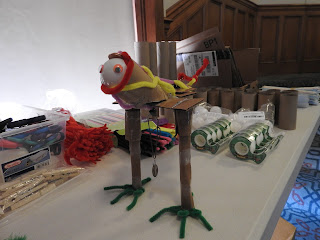
On Thursday, August 25th, while the rest of the library was closed early, kids and their parents were hanging out here in the children's Story Room learning about paleontology and center of gravity, and building their own dinosaurs! I showed a slide show about how scientists' concepts of dinosaurs has changed over the years, particularly when we think about how a dinosaur would have stood or walked. Based on scientists' knowledge of anatomy and the weight of dinosaur bones, they've come to the conclusion that most dinosaurs had tails that stuck straight out, and provided balance while holding their heads and upper bodies in a forward (not upright!) position. Curiosity Machine: Build a Balanced Dinosaur from AnnMarie Ppl Then we took a wide variety of materials, including toilet paper tubes, cardboard, tape, plastic straws, pipe cleaners, and a few colorful and fun materials like feathers and googly eyes, and made dinosaurs that stood at least 6" ta...

Science at Storytime: A Preschool Planetarium

Image
On Saturday, we had our library preschool storytime. I've been wanting to get out there and see the planets lined up in the pre-dawn sky , but I haven't been able to get myself up early enough. So I found another way to enjoy this phenomenon, and shared it with the preschoolers and their families at storytime. Using one of the library's iPads, we turned the storyroom into a preschool planetarium! We have an app called SkyView which allows you to see the locations and images of stars, planets, galaxies, satellites and other celestial objects surrounding the Earth by simply pointing the iPad in any direction. Why I decided to do this was so that the kids could see something that's probably very hard for them to see, and something they won't get another chance to witness for at least ten years! Currently, and for only a very limited time, all five visible planets are in the same part of our sky, and can be seen with the naked eye just before dawn. But sin...

Curiosity Machine: Magnet Structures

Image
  Everybody knows magnets are FUN, but did you know scientists use magnets when making certain kinds of polymers?  Did you know that magnets can help chemists to sort out the tangled mess of molecules that most polymers consist of? Today's Curiosity Machine class focused on Making a Self-Assembling Structure using magnets, but the class wasn't just about magnets. One kind of self-assembling structure is a polymer, a long chain of repeating molecules that bind to create one super-strong molecule. We learned about polymers and a bit about atomic structure, then we turned our attention to magnets and to making our own structures that would link together using magnetic force. First, watch this video to get the highlights of our class: Here are my slides with recommended books for further reading: Curiosity Machine: Magnet Structures! from AnnMarie Ppl Here are some of those books: We had the table set up with dice of all kinds, pencils, paper, tape disp...

Scratch for Experienced Users: Flappy Bat

Image
Today we made videogames using Scratch, based on the infamous "Flappy Bird" videogame that brought its creators notoriety and established them in the halls of memorable bad game design forever :) We followed a tutorial I created and chose new sprites for our flappy character--many kids chose airplanes, fish, or other animals, and a few chose bats. The end code looks something like this (this is just the code for the bat that flies through the pipes): The final product is supposed to work like this (click on the picture and you'll be taken to the game which you can play): If you'd like to see the kids' projects they are posted here: Pasadena Library Kids' Blog The kids did a great job. Even one child who was not really very experienced with Scratch turned out to be quite sharp and able to follow all the difficult instructions. Despite having a lot of technical difficulties, almost everyone was able to go home with a finished game emailed to the...